Chat and booking widgets
Greetio can live on your own website in two ways:
| Widget | What the guest gets | Where to set it up |
|---|---|---|
| Chat widget | A chat bubble; the conversation lands in the same inbox as Telegram or WhatsApp | /settings/web-widget |
| Booking widget | A booking form for rooms and services, with the slot held while they pay | /settings/booking |
Both are under Settings → Widgets and are set up the same way: list the domains they may run on, get a token, paste a snippet into your site.
Chat widget
Owners, managers and administrators set up the chat widget; viewers can only look.
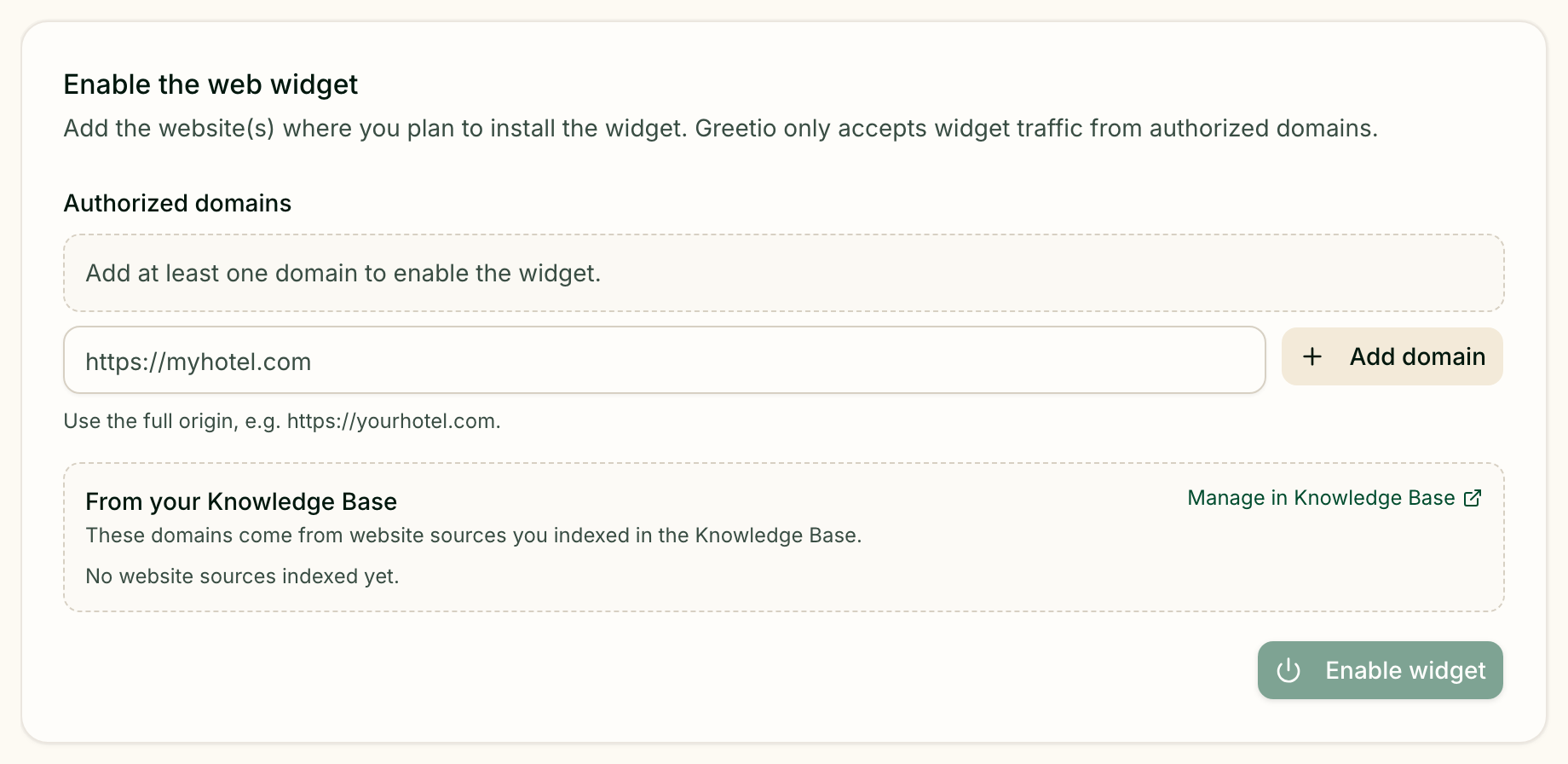
Turn it on
- Under Enable the web widget, add the site addresses where the widget will
run, as full origins such as
https://yourhotel.com. Addresses of sites you indexed in the knowledge base are suggested below. - Press Enable widget and confirm the domains with Yes, enable widget.
- The Install card now shows the snippet. Copy snippet and paste it into every page of your site — in the page head or just before the end of the page body.
Status & analytics tells you whether it worked: Installed & active once the widget has loaded on your site, Not detected yet until then. It also counts visitors and chats over the last 30 days, and chats in total.
Conversations from the widget arrive in the Inbox under the Web channel.
Control where it runs
Authorized domains is the list of sites allowed to show the widget; requests
from anywhere else are refused. A wildcard such as https://*.example.com allows
every subdomain and the root domain. Save domains applies the list.
Revoke & regenerate token issues a new token. The snippet already on your site stops working until you replace it, so only do this if the old one has leaked. Disable widget removes the chat bubble from your site at once; you can turn it back on later.
Make it look like your site
| Card | What you set |
|---|---|
| Branding | Accent colour for the send button and the guest's messages, Position (Bottom right or Bottom left), and a Launcher logo — square PNG, JPEG, WebP or SVG up to 1 MB |
| Appearance | Theme (Match visitor device, Always light, Always dark), Default language, Header title (the property name if left empty), Header subtitle, and Hide “Powered by Greetio” |
Default language can follow the property language or be fixed to English, Ukrainian or Italian.
Live preview shows the widget with your current branding and appearance. Every card has its own save button; nothing on it applies until you press it.
Greet visitors and show when you are available
Greeting & availability holds the texts visitors see first:
- Welcome message — at the top of an empty chat;
- Away message — shown instead of the welcome outside your hours;
- Expected reply time — a short line next to your status.
Turn on Show online / away status and set opening hours for each day of the week. The hours follow the property's timezone.
Proactive message opens the conversation for the visitor: after the
Delay (seconds) you choose, a teaser appears above the chat bubble, and
clicking it opens the chat with that message. Page filter limits it to pages
whose address contains the text you enter, such as /rooms.
Ask for details before the chat
With Show a pre-chat form on, new visitors fill in a short form before the chat opens. Name and Email can each be Hidden, Optional or Required. Fill in Consent notice and visitors must tick a consent box before they can start.
Booking widget
The booking widget lets guests book rooms and services — a sauna, a hot tub — straight from your site and pay online. Owners and managers set it up.
Turn it on and install it
- Under Turn on booking, list the domains allowed to embed the form.
- Press Issue token and confirm with Yes, turn booking on.
- Installation now offers two ways in:
- Direct link — for social media bios and messages; it always opens the full booking module. Copy or Open it.
- Embed on the site — a tag for your pages, in two variants: Short form for any page (the guest picks dates and the full module opens in its place) and Full module for a page dedicated to booking.
The choice between short form and full module is made per page, not per hotel: you can use both on the same site.
Rotate token issues a new token; the old link and the old tag stop working at once. Turn off stops the form everywhere — slots already held keep their deadline.
Authorized domains can be changed later without replacing the tag. Before saving, Greetio lists any domains you removed, because the form stops working on them immediately.
Match your brand
Appearance takes one Primary color — used for buttons, the progress bar, selected dates and times, links and icons — and a Scheme, Light or Dark. Reset to default brings back the original colour.
Preview shows the real module with your rooms, photos, prices and free dates, and picks up colour changes before you save them. Switch between Short form and Full module, Desktop and Phone, and Start over to replay it. Nothing can be booked or paid for in the preview: at the payment step it explains what would happen instead. On your site the module uses your site's font and sits on your background, so it looks slightly different there.
Set the booking rules
Booking rules apply to every booking made through the widget, with one Save for the whole card.
Payment:
- tick the payment methods the guest may use: Card, Instalments, Company invoice. Next to card and instalments you see whether the monobank contract is connected, or a link to connect it on Payment systems;
- Company invoice — the switch that lets a company pay by invoice instead of a card.
Booking:
| Setting | Meaning |
|---|---|
| Hold a slot for, minutes | How long the slot is kept while the guest fills in contacts; payment adds 20 minutes |
| Hold for an invoice, minutes | A longer hold for company invoices; empty means the same as everyone else |
| Pets | Not allowed, Allowed or On request |
| Breakfast, price per guest per night | Children pay the same; empty means breakfast is not offered |
| Services on the departure day | Whether a guest can book a service for the day they check out |
Links to the rules — House rules, Cancellation terms and Privacy
policy — turn into links in the consent the guest accepts. Use full
addresses starting with https://; an empty field stays plain text.
Payments made through the widget appear in the payments list with the source Booking module.
Current limits
- Online payment is monobank only — card and instalments.
- The chat widget's own buttons and labels come in three languages — English, Ukrainian and Italian.
- Nothing runs without a domain. Both widgets refuse to load on sites that are not on their list.