AI autopilot
These settings decide how independently the assistant talks to your guests: whether it answers on its own or only prepares drafts, what it may book, and when it hands a conversation to your team. Open Settings → AI Autopilot; it is in the Communication group of the settings menu.
What the assistant says comes from your knowledge base. These settings govern how it behaves, not what it knows.
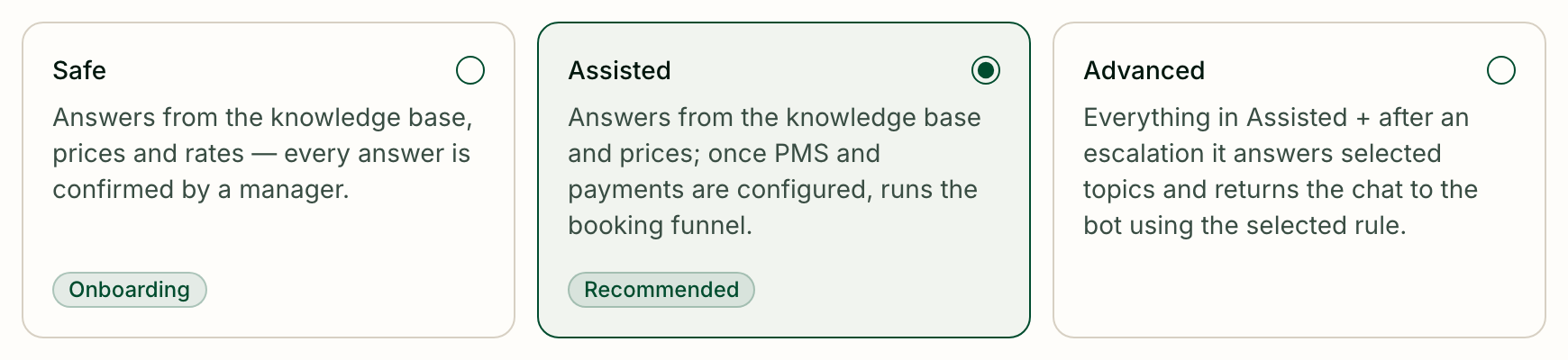
Choose the mode
The first page holds one choice, Autopilot Mode. It is saved the moment you click.
| Mode | What the assistant does |
|---|---|
| Safe | Answers from the knowledge base, prices and rates, but a manager confirms every answer before it is sent. Marked Onboarding — start here |
| Assisted | Answers from the knowledge base and prices on its own; once a PMS and payments are set up, it also walks the guest through booking. Marked Recommended |
| Advanced | Everything in Assisted, plus: after a conversation has been handed to a manager, it keeps answering the topics you allow and takes the conversation back by the rule you choose |
Test a mode in the AI sandbox before guests meet it — see Inbox.
Below the modes, the Advanced settings card sums up what is set further in: whether booking is on, the manager's working hours and the number of your own handoff rules. Click it to open the rest.
Find your way around Advanced settings
The page is long, so it has an On this page list of sections and a Search settings box. Nothing is saved until you press Save; Discard changes throws your edits away. If you try to leave with unsaved changes, Greetio asks first.
The sections are General, Booking, Handoff to a manager and Additional.
General: tone, name and hours
Confidence level sets how often the assistant answers on its own versus handing a draft to a manager:
| Level | Effect |
|---|---|
| Loyal | Answers on its own more often; managers see fewer drafts |
| Balanced | The default balance. Marked Recommended |
| Careful | Hands more replies to a manager; managers see more drafts |
Response Tone is Professional, Friendly or Casual. AI Persona Name is the name the assistant introduces itself by — "Mila", "Concierge".
Manager working hours do not switch the assistant off: it replies around the clock. They tell it when a human reply is possible. Outside these hours, when a question needs a manager, the assistant tells the guest the answer will come later. Turn on Manager available 24/7 if someone is always there — then the assistant never warns about waiting.
Booking: rooms
The Booking section has two tabs, Rooms and Services.
On Rooms:
Availability source for AI — where the assistant checks free rooms and creates bookings:
- Off — AI does not check availability;
- Internal — use this app's calendar, for properties without a PMS: the calendar in Greetio;
- PMS — read from the connected PMS.
Booking — how far the assistant takes a room booking:
| Option | What happens |
|---|---|
| Off — AI does not create bookings | It checks and quotes, a person books |
| Assisted — AI creates a tentative booking, manager sends the payment link | The booking appears as tentative; your team sends the payment link |
| Payment — AI sends the payment link and confirms payment | The assistant handles the booking end to end |
Booking needs an availability source; with the source off, it stays off. Payment needs Monobank connected and switched on in the payment settings.
Booking funnel lists what the assistant asks, in order: Room choice, Dates, Collect contacts and Confirm + link. You can reword each Question and choose which contacts to collect — Name, Phone, Birth date, Email.
Message after payment is sent to the guest once payment is confirmed — directions, check-in time, parking. Leave it empty to send nothing.
Booking / cancellation rules are the terms the assistant quotes while booking:
- Prepayment to confirm — a percentage, a fixed sum, or the First night;
- Free cancellation before arrival, in hours or days;
- Pay within — if the guest does not pay in time, the booking is released;
- No-show fee, %;
- Full policy text shown to guests — quoted when a guest asks about the rules.
Booking: services
On Services:
Service availability source — Internal — Greetio service calendar lets the assistant find free times in the service calendar and book them; Off — AI does not offer service booking turns it off.
Service booking behavior lists your active services. For each one, the Bookable switch lets the assistant discuss it as something to book, and the Booking model sets how far it goes:
| Booking model | What the assistant does |
|---|---|
| Request | Takes down the request and creates a task for the Inquiry department — no booking is made |
| Availability | Tells the guest which times are free; a person makes the booking |
| Booking | Creates a booking request that your team confirms on the Bookings page |
| Payment | Books straight away |
A bookable service with no active resources shows a warning and a Configure resources link: without resources there is nothing to check availability against.
The Booking / cancellation rules on this tab belong to one service at a time — pick it in Applies to. Here the Service payment method is Full payment, Prepayment or Pay at property.
Hand off to a manager
Custom escalation rules starts with the cases in which the assistant always hands over, whatever you set: complaints, requests for a manager, medical or safety questions, lost and found, spam; a guest sharing card or passport details; a request for specific dates while availability is off; a guest repeating the same question; attempts to trick the assistant.
Under Free-form rules you can add up to three of your own with Add rule. A rule has a Rule name, a Condition written in plain words — "the guest mentions specific dates and asks for a price" — and a Template: the message the guest gets before the handoff. Keep conditions narrow; a broad one fires more often than you meant. Not every role may edit these rules or the custom instructions; if yours may not, the fields are read-only and a note says so.
In the Advanced mode
With Advanced chosen, this section also holds Advanced rules:
Behavior by topic — for Prices, Availability, Policies, General questions and Booking status, choose Reply (answer on its own), Draft (prepare a reply for a manager to send) or Manager (leave it to a person). Safety and health, legal threats, payment disputes, overbooking, haggling and explicit requests for a manager always go to a person.
When AI should return — Ask the manager first, Return automatically or Never return automatically. Manager silence cooldown is how long the manager must stay quiet before the assistant treats them as gone; it is checked when the guest writes again, and can be up to 30 days.
Additional
- Custom instructions — a few short house rules for the assistant, up to 1500 characters: "Always mention parking is free." Do not copy the knowledge base here; one to three rules work best.
- Message merging — the assistant waits a few seconds after the guest's last message so that "Hello!" and "Do you have a room for this weekend?" get one reply, not two. The wait is 10 seconds by default, from 1 to 20, and starts again if the guest adds another message. Turn Merge consecutive messages off to reply without waiting.
- Promotions in AI replies — show every active promotion next to the price, only those relevant to what the guest asked, or none. See Promotions.
- Cost & ROI — the staff minutes one AI reply saves, the staff cost per hour and the cost of one AI reply. Analytics uses them to value the time saved; leave them empty for a default estimate.